> For the complete documentation index, see [llms.txt](https://help.pickyassist.com/llms.txt). Markdown versions of documentation pages are available by appending `.md` to page URLs; this page is available as [Markdown](https://help.pickyassist.com/whatsapp-commerce/logistics-integration/logistics-core-module/bulk-order-printing-for-packaging.md).
# Bulk Order Printing for Packaging
### Overview
Bulk Order Printing for Packaging lets warehouse teams print multiple packaging documents at once.
This helps the packing team process orders faster and in a more organized way.
{% hint style="warning" %}
Note: Currently, you can print up to 100 orders at a time.
{% endhint %}
### Why it matters
Printing orders one by one increases handling time during packing.
Bulk printing helps reduce:
* Slow packing operations
* Increased manual effort
* Higher chances of errors or missed orders
With bulk printing, you can:
* Speed up packaging workflows
* Reduce repetitive tasks
* Improve order handling efficiency
* Handle high order volumes more smoothly
### How it works
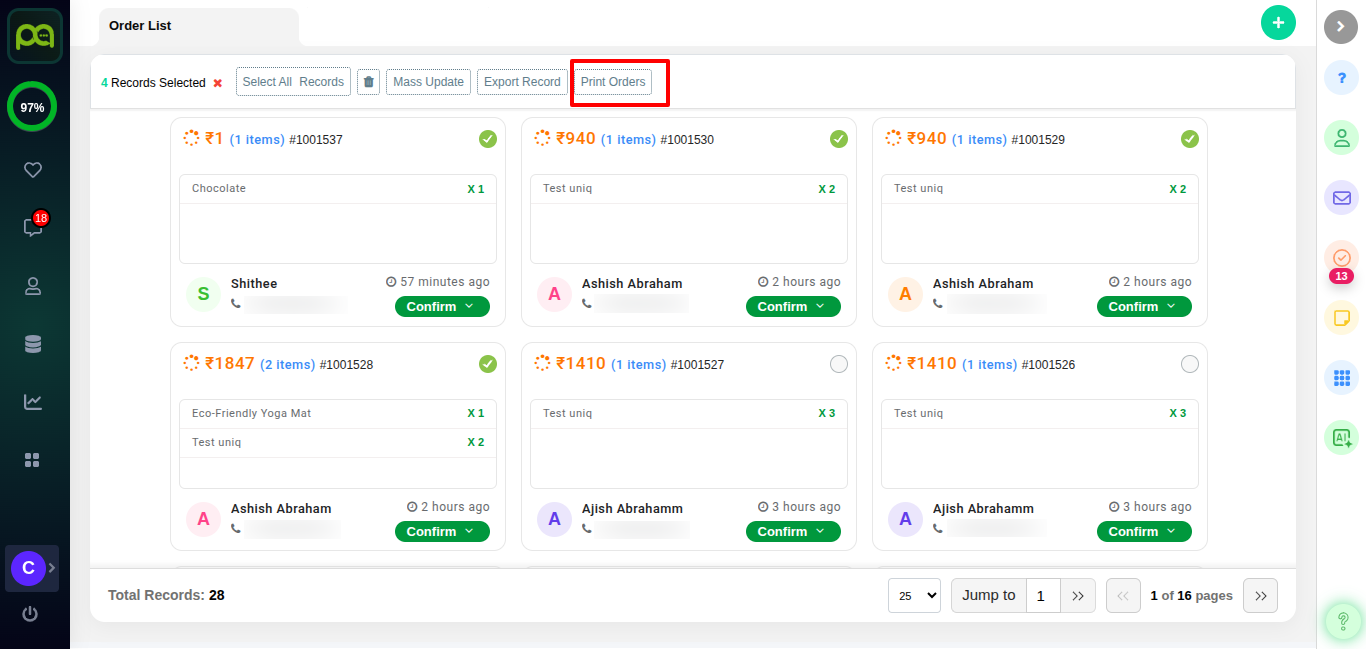
1. Go to the Orders section.
2. Select multiple orders using checkboxes.
3. Click **Print orders**.
4. The system generates a combined printable document for all selected orders.
The warehouse team can then use this document to pack multiple orders in one batch.
### Barcode for third-party delivery pickup
When you use a third-party delivery provider, each package is given a unique barcode when the pickup is requested.
Here’s how it works:
* Once the shipment is created, a barcode is generated for that package and it is visible in the order invoice.
* This barcode contains important details like the order ID, customer information, and delivery address.
* When the delivery agent arrives at the store, they scan the barcode using their device.
* After scanning, they can instantly view the package details on their screen.
* This helps them confirm they are picking up the correct order without confusion.
In short, the barcode acts like a digital ID for the package, making pickup faster, more accurate, and error-free.
### Example
* A warehouse executive selects 30 orders that are ready for packaging.
* With a single click, all 30 orders are printed together.
* The packing team processes them as one batch, reducing time and effort.
---
# Agent Instructions
This documentation is published with GitBook. GitBook is the documentation platform designed so that both humans and AI agents can read, navigate, and reason over technical content effectively. Learn more at gitbook.com.
## Querying This Documentation
If you need additional information that is not directly available in this page, you can query the documentation dynamically by asking a question.
Perform an HTTP GET request on the current page URL with the `ask` query parameter, and the optional `goal` query parameter:
```
GET https://help.pickyassist.com/whatsapp-commerce/logistics-integration/logistics-core-module/bulk-order-printing-for-packaging.md?ask=&goal=
```
`ask` is the immediate question: it should be specific, self-contained, and written in natural language.
`goal` is optional and describes the broader end goal you are ultimately trying to accomplish on behalf of the user. GitBook uses it to tailor the answer towards what is most useful for that goal.
The response will contain a direct answer to the question and relevant excerpts and sources from the documentation.
Use this mechanism when the answer is not explicitly present in the current page, you need clarification or additional context, or you want to retrieve related documentation sections.